Agentic AI · BraivIQ AI Engineering Playbook
Agent Approval Workflow: One ID Per Interrupt, Strict Resume And Policies On The Tool That Really Runs
An agent approval workflow fails quietly when an answer reaches the wrong pause, or when a policy checks a name instead of the tool that runs. LangGraph 1.2.20, released on 5 November 2026, gives each interrupt() in a task its own ID and adds a strict resume mode that refuses stale interrupt answers. Inspect 0.3.287, released on 31 October, makes approval policies see a bridged tool call under the tool it runs, whatever name the agent declared. This playbook builds both guarantees in tested Python, with a hash of what the reviewer saw and an audit log of every pause, refusal and approval.
Published · Updated · 13 min read · By BraivIQ Engineering
Key takeaways
- LangGraph 1.2.20 (5 November 2026) gives each interrupt() in a task its own ID and adds a strict resume mode that refuses stale interrupt answers.
- Inspect 0.3.287 (31 October 2026) makes approval policies see a bridged tool call under the tool it runs, whatever name the agent declared.
- Bind every pause to a hash of what the reviewer saw. If the payload changed, the old answer must not count.
- Resolve aliases to the real tool before applying policy, and deny anything the registry does not know.
- Log every interrupt, refusal and approval, so you can show which answer released which action.
1.2.20 - LangGraph release adding per-interrupt IDs and strict resume (5 November 2026) · 0.3.287 - Inspect release that applies approval policies to the tool that actually runs (31 October 2026) · 0 - Approvals that should count for a pause the reviewer did not see
A sound agent approval workflow has two properties that are easy to miss. An answer must reach exactly the pause the reviewer looked at, and a policy must judge the tool that will actually run. Two releases in the last week make both explicit. This is the pattern our Agentic AI London team builds into every agent, and it sits behind the approvals queue in our Desk Twin.
Both samples below run on Python 3.14.4 with the standard library only. They show the contract in plain code, so you can test the same behaviour in whatever framework you use.
What changed in LangGraph and Inspect this week?
LangGraph 1.2.20, released on 5 November 2026, lists three relevant changes: each interrupt() in a task gets its own ID, the multiple-interrupts error points at the current docs, and a strict resume mode refuses stale interrupt answers. LangGraph 1.2.19, released on 30 October, stopped reporting a paused tool as failed on the tools stream and lists ToolNode tool names in graph node metadata.
Inspect 0.3.287, released by the UK AI Security Institute on 31 October 2026, fixed a gap in a different place: approval policies now see a bridged tool call under the tool it runs, whatever name the agent declared. The same release makes an agent limit reached by a sandbox-bridged agent end that agent, not the whole sample.
Why do approvals go stale?
- **Two pauses in one task.** If a task can pause twice, an answer meant for the first can land on the second unless each pause has its own ID.
- **The payload moved on.** A reviewer approves a chaser for two breaks. One break clears before they click. The chaser that runs is not the one they saw.
- **Replays.** An approval used once is presented again after a retry or a resume from checkpoint.
- **Aliases.** The agent calls notify or email_counterparty, the policy only knows send_email, and the call slips through as unknown.
What does a safe agent approval workflow look like?
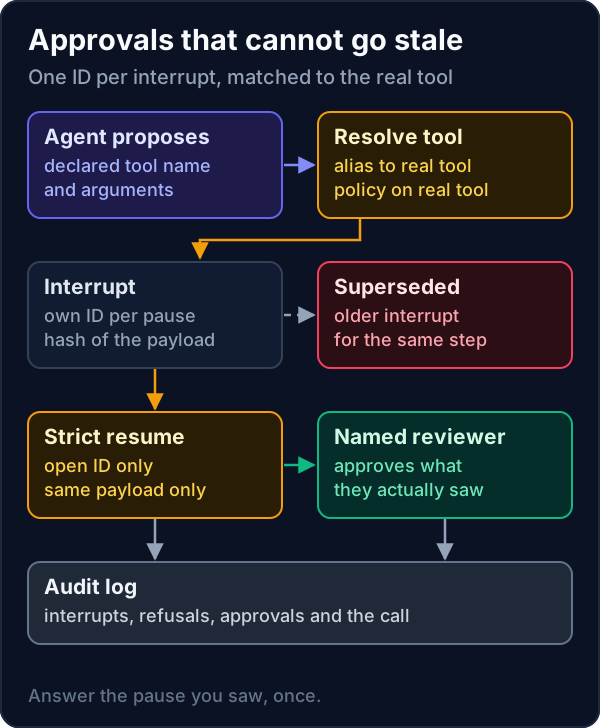
How do you make each interrupt unique and each resume strict?
interrupts.py"""Approval checkpoints with one ID per interrupt and a strict resume that refuses stale answers.
LangGraph 1.2.20 (5 November 2026) gives each interrupt() in a task its own id and adds a strict resume
mode that refuses stale interrupt answers. This is the same contract in plain Python, so you can see
what it protects against. Python 3.14 standard library only (sqlite3). Sample data only.
"""
from __future__ import annotations
import hashlib
import json
import sqlite3
import uuid
db = sqlite3.connect(":memory:")
db.execute("CREATE TABLE interrupts (id TEXT PRIMARY KEY, run TEXT, step TEXT, payload_hash TEXT, status TEXT)")
db.execute("CREATE TABLE audit (n INTEGER PRIMARY KEY, event TEXT, detail TEXT)")
def digest(payload: dict[str, object]) -> str:
return hashlib.sha256(json.dumps(payload, sort_keys=True).encode()).hexdigest()
def log(event: str, **detail: object) -> None:
db.execute("INSERT INTO audit (event, detail) VALUES (?, ?)", (event, json.dumps(detail, sort_keys=True)))
def interrupt(run: str, step: str, payload: dict[str, object]) -> str:
"""Pause for a person. Each pause gets its own id, bound to what the person will see."""
iid = uuid.uuid4().hex[:12]
db.execute("UPDATE interrupts SET status='superseded' WHERE run=? AND step=? AND status='open'", (run, step))
db.execute("INSERT INTO interrupts VALUES (?,?,?,?, 'open')", (iid, run, step, digest(payload)))
log("interrupt", id=iid, step=step)
return iid
def resume(iid: str, seen_payload: dict[str, object], decision: str, reviewer: str) -> str:
"""Strict resume: the answer must name an open interrupt and the exact payload the reviewer saw."""
row = db.execute("SELECT status, payload_hash FROM interrupts WHERE id=?", (iid,)).fetchone()
if row is None or row[0] != "open":
log("resume_refused", id=iid, reason=f"interrupt is {row[0] if row else 'unknown'}")
return f"refused: interrupt {iid} is {row[0] if row else 'unknown'}"
if row[1] != digest(seen_payload):
log("resume_refused", id=iid, reason="payload changed")
return "refused: the reviewer saw a different payload"
db.execute("UPDATE interrupts SET status=? WHERE id=?", (decision, iid))
log("resumed", id=iid, decision=decision, reviewer=reviewer)
return f"{decision} by {reviewer}"
if __name__ == "__main__":
chaser = {"to": "Sample Custodian Ltd", "breaks": ["BRK-1043", "BRK-1051"]}
first = interrupt("run-7", "send_chaser", chaser)
second = interrupt("run-7", "send_chaser", {**chaser, "breaks": ["BRK-1043"]}) # break 1051 cleared meanwhile
print("old answer:", resume(first, chaser, "approved", "ops.lead@example.co.uk"))
print("edited view:", resume(second, chaser, "approved", "ops.lead@example.co.uk"))
print("current:", resume(second, {**chaser, "breaks": ["BRK-1043"]}, "approved", "ops.lead@example.co.uk"))
print("replay:", resume(second, {**chaser, "breaks": ["BRK-1043"]}, "approved", "ops.lead@example.co.uk"))
for n, event, detail in db.execute("SELECT * FROM audit"):
print(f" {n} {event:<15} {detail}")Python 3.14.4, standard library only. Run once as shown. Sample data only.
The first interrupt is superseded when the payload changes, so its answer is refused. The second answer is refused because the reviewer saw a payload with two breaks while the pause now holds one. The correct answer releases the step, and a replay is refused because the interrupt is already approved. The audit table shows all six events in order.
How do you apply policy to the tool that really runs?
tool_policy.py"""Approval policy keyed on the tool that actually runs, not the name the agent declared.
Inspect 0.3.287 (31 October 2026): approval policies now see a bridged tool call under the tool it runs,
whatever name the agent declared. If a policy matches names, an alias can walk past it. Resolve first,
then decide. Python 3.14 standard library only. Sample tools only.
"""
from __future__ import annotations
from dataclasses import dataclass
REGISTRY = {"read_breaks": "recs.read_breaks", "send_email": "comms.send_email", "notify": "comms.send_email",
"email_counterparty": "comms.send_email", "update_ssi": "static.update_ssi"}
POLICY = {"recs.read_breaks": "allow", "comms.send_email": "approve", "static.update_ssi": "deny"}
AUDIT: list[str] = []
@dataclass(frozen=True)
class Call:
agent: str
declared: str
args: dict[str, str]
def decide(call: Call) -> str:
real = REGISTRY.get(call.declared)
if real is None:
AUDIT.append(f"{call.agent} {call.declared} -> unknown -> deny")
return "deny"
action = POLICY.get(real, "deny") # anything without a rule is denied
AUDIT.append(f"{call.agent} {call.declared} -> {real} -> {action}")
return action
def naive_decide(call: Call) -> str:
return {"read_breaks": "allow", "send_email": "approve", "update_ssi": "deny"}.get(call.declared, "allow")
if __name__ == "__main__":
calls = [Call("recs-01", "read_breaks", {}), Call("recs-01", "notify", {"to": "cpty@example.com"}),
Call("recs-01", "email_counterparty", {"to": "cpty@example.com"}), Call("recs-01", "patch_static", {})]
for c in calls:
print(f"{c.declared:<20} naive: {naive_decide(c):<8} resolved: {decide(c)}")
print("\n".join(" " + a for a in AUDIT))Python 3.14.4, standard library only. Run once as shown. Sample tools only.
A policy that matches declared names allows notify, email_counterparty and an unknown patch_static. Resolving first sends both email aliases to approval and denies the unknown tool. Keep the registry in code review, and treat any tool without a rule as denied.
What breaks in production?
- **Approval screens that rebuild the payload.** If the screen re-renders arguments, the hash changes and good approvals fail. Show the stored payload and its hash.
- **Long waits.** Records change while a person decides. Put a version or timestamp in the payload so a changed record means a new interrupt.
- **Upgrades that change resume behaviour.** Turning on a strict mode can surface answers your UI was sending to the wrong pause. Test resumes after every upgrade.
- **Registries that drift.** A new tool added without a policy rule should fail closed, and a test should prove it.
- **Audit logs beside the agent.** Ship the log to storage the agent host cannot change.
What are the alternatives to building this yourself?
| Option | Good fit | What to check |
|---|---|---|
| LangGraph interrupts with strict resume | Agent graphs already on LangGraph 1.2.20 or later | That your UI sends the interrupt ID and the payload hash back |
| Inspect approval policies | Evaluations and agent runs inside Inspect | That policies are written against resolved tools after 0.3.287 |
| A workflow engine with signals | Long-running approvals across services | That a signal is tied to one pause and one payload |
| Your own store, as above | Payments, client messages and static data | Ownership of the tests for replay, staleness and aliases |
Our earlier playbook on AI agent code in Python binds approvals to argument hashes, and agent memory isolation covers who can see what. For non-technical colleagues, our blog explains human in the loop AI.
Where should a team start?
Find every place an agent pauses for a person and check that the answer carries the pause ID and the payload hash. Then list every tool alias and confirm the policy sees the real tool. Our AI developers in London build this into every agent, as our services page describes, and a 14-day Proof Run puts one workflow live with the approval point and audit log from day one.
Frequently asked questions
What is an agent approval workflow?
It is the set of pauses where an AI agent stops and waits for a person to approve, change or reject a proposed action, plus the rules that decide which actions need a pause and the log that records each decision.
What changed in LangGraph 1.2.20?
Released on 5 November 2026, it gives each interrupt() in a task its own ID and adds a strict resume mode that refuses stale interrupt answers, according to its release notes.
Why should approval policies use the real tool name?
Because an agent can call the same tool under different names. Inspect 0.3.287, released on 31 October 2026, made approval policies see a bridged call under the tool it runs. Resolve aliases first, then decide, and deny unknown tools.
What makes an approval stale?
An approval is stale when the action it releases is no longer the one the reviewer saw, for example because the payload changed, a newer pause replaced it, or the approval was already used.
References
- LangChain (GitHub), "langgraph 1.2.20 release notes", 5 November 2026. https://github.com/langchain-ai/langgraph/releases/tag/1.2.20
- LangChain (GitHub), "langgraph 1.2.19 release notes", 30 October 2026. https://github.com/langchain-ai/langgraph/releases/tag/1.2.19
- UK AI Security Institute (GitHub), "Inspect CHANGELOG, release 0.3.287", 31 October 2026. https://github.com/UKGovernmentBEIS/inspect_ai/blob/main/CHANGELOG.md