AI Strategy & ROI · BraivIQ AI Engineering Playbook
LLM Spend Limits: Building Cost Controls On The New Claude Analytics And Spend Limit APIs
LLM spend limits stop an agent loop from turning into an invoice surprise. Anthropic launched the Usage and Cost Analytics API in beta on 29 October 2026, reporting usage and cost grouped by model, workspace, API key and user or service account. Version 2.4.0 of the Python SDK, released on 2 November 2026, added generally available methods for analytics, spend limits and role-based access control. This guide shows how to turn those reports into a daily check with a forecast, alerts and an owner's approval for any limit increase.
Published · Updated · 7 min read · By BraivIQ Engineering

Key takeaways
- Anthropic launched the Usage and Cost Analytics API in beta on 29 October 2026, with usage and cost endpoints for Claude Console and Claude Enterprise organisations.
- Results can be filtered and grouped by model, workspace, API key and the user or service account behind each request.
- The older Usage and Cost API is now legacy but remains supported.
- Anthropic Python SDK 2.4.0 (2 November 2026) added generally available methods for analytics, spend limits and RBAC, plus spend limit period filters.
- Run a daily month-to-date check with a forecast, alert the budget owner early and let only that owner approve a higher limit.
LLM spend limits are caps on how much a workspace, team or key can spend on model usage in a period. For an agent that loops, retries or reads long documents, they are the difference between a predictable bill and an awkward conversation with finance. Anthropic shipped new reporting and limit tooling in the last fortnight, and it makes a proper control loop straightforward to build.
What changed in the Claude APIs?
On 29 October 2026 Anthropic launched the Usage and Cost Analytics API in beta, using the analytics-usage-cost-2026-08-24 beta header. Its /v1/organizations/analytics/usage and /v1/organizations/analytics/cost endpoints report token usage and cost for Claude Console and Claude Enterprise organisations. Results can be filtered and grouped by dimensions such as model, workspace, API key and the user or service account behind each request.
The same release notes mark the older Usage and Cost API as legacy, along with the usage and cost report endpoints of the Claude Enterprise Analytics API. All of them remain supported, and Anthropic publishes migration guides.
Version 2.4.0 of the Anthropic Python SDK, released on 2 November 2026, added generally available methods for analytics, spend limits and RBAC, types for analytics group_by and spend limit period filters, and a fix to the response when a spend limit increase request is approved. Version 2.0.0, released on 21 October 2026, added a workspace_id filter and a usage_tier scope type when listing spend limits.
Why do LLM spend limits matter for agents?
A person using a chat tool spends in small, visible steps. An agent can spend in the background, all night. A retry loop on a failing tool, a document set that grew, or a switch to a larger model can multiply a workspace's spend within days. Prices move too. The Gemini API changelog of 2 November 2026 says requests to gemini-2.5-pro will be rerouted to gemini-3.8-flash from 1 December 2026 and billed at Gemini 3.8 Flash rates, so a cost line can change without any change to your code.
Our blog on AI cost reporting and cloud procurement covers the finance side. This guide covers the engineering.
How do you build a spend control loop?
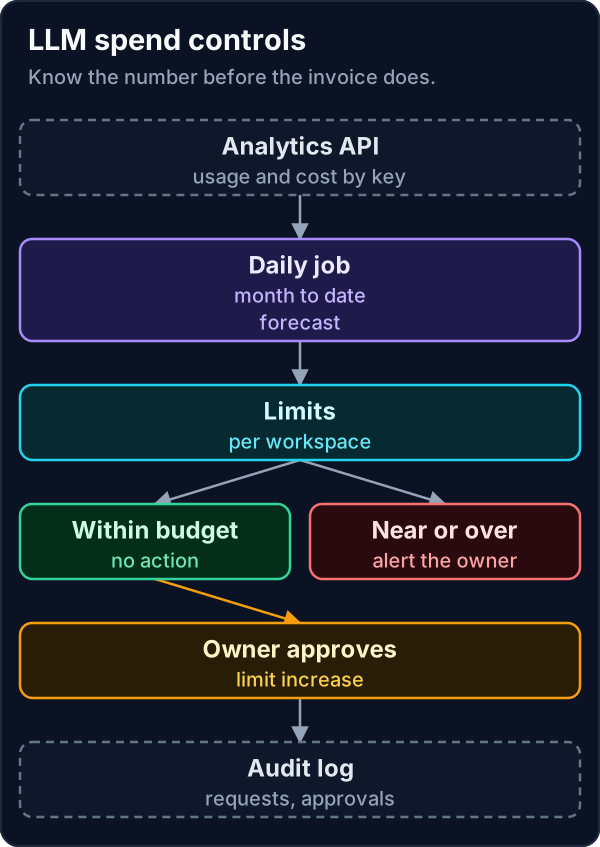
- **Separate keys.** One workspace per team or product and one API key per agent, so the analytics can group cost by the thing that spent it.
- **Daily pull.** Fetch month-to-date cost grouped by workspace and API key from the analytics endpoints.
- **Forecast.** Project the month-end figure from the run rate so far.
- **Alert early.** Warn the budget owner at 80% of the limit on forecast, not on actuals.
- **Approve increases.** Only the named budget owner can approve a higher limit, and the request and approval go to the audit log.
spend_guard.py"""Month-to-date LLM spend against limits, with a forecast and an approval step.
Python 3.14, standard library only. Rows stand in for an export from the Claude
Usage and Cost Analytics API (beta, 29 October 2026), grouped by workspace and
API key. The figures are made up."""
import calendar, datetime as dt, json
LIMITS = {"ops-agents": 1500.0, "research": 600.0} # USD per month, set by budget owners
OWNERS = {"ops-agents": "head.of.ops", "research": "cto"}
ROWS = [ # (day, workspace, api key name, cost in USD)
(1, "ops-agents", "recs-agent", 41.0), (2, "ops-agents", "recs-agent", 44.5),
(3, "ops-agents", "breaks-agent", 96.0), (4, "ops-agents", "breaks-agent", 210.0),
(5, "ops-agents", "recs-agent", 47.0), (6, "research", "notebook", 120.0),
(7, "research", "notebook", 95.0), (8, "ops-agents", "breaks-agent", 225.0),
(9, "research", "notebook", 30.0), (10, "ops-agents", "recs-agent", 43.0),
]
AUDIT: list[dict] = []
def report(today: dt.date) -> list[dict]:
days = calendar.monthrange(today.year, today.month)[1]
out = []
for ws, limit in LIMITS.items():
rows = [r for r in ROWS if r[1] == ws and r[0] <= today.day]
mtd = sum(r[3] for r in rows)
forecast = mtd / today.day * days
by_key: dict[str, float] = {}
for r in rows:
by_key[r[2]] = by_key.get(r[2], 0) + r[3]
flag = "over" if forecast > limit else "watch" if forecast > 0.8 * limit else "ok"
out.append({"workspace": ws, "mtd": round(mtd, 2), "forecast": round(forecast, 2),
"limit": limit, "flag": flag, "top_key": max(by_key, key=by_key.get)})
return out
def request_increase(ws: str, new_limit: float, requested_by: str, approver: str) -> str:
if approver != OWNERS[ws]:
AUDIT.append({"ws": ws, "event": "increase refused", "by": approver})
return "refused: only the budget owner can approve"
AUDIT.append({"ws": ws, "event": "limit raised", "old": LIMITS[ws], "new": new_limit,
"requested_by": requested_by, "approved_by": approver})
LIMITS[ws] = new_limit
return "approved"
if __name__ == "__main__":
for line in report(dt.date(2026, 11, 10)):
print(json.dumps(line))
print(request_increase("ops-agents", 2500.0, "platform.eng", "platform.eng"))
print(request_increase("ops-agents", 2500.0, "platform.eng", "head.of.ops"))
print(json.dumps(AUDIT))Python 3.14, standard library only. The rows stand in for an export from the analytics endpoints and the figures are made up. Run once for 10 November, it flags both workspaces as forecast to go over, names the API key spending most, refuses a limit increase approved by the requester and accepts the budget owner's approval.
The sample uses its own field names for the export. Map them to the analytics API response in your integration, and check the field names against Anthropic's documentation when you build it rather than assuming.
Where does the person approve?
At the limit. An engineer can request an increase with a reason, but the budget owner approves it. The sample refuses an approval from the requester and accepts one from the owner. The audit log keeps the old limit, the new limit, the requester and the approver.
Use RBAC so that the keys agents use cannot change limits. A service account that runs an agent should be able to call models and nothing else. Our playbook on LLM API key security covers key scoping in a bank setting.
What breaks in production?
- **Shared keys.** One key across several agents makes the analytics useless for finding the cause. Split keys before you need the answer.
- **Actuals-only alerts.** An alert at 100% of actual spend arrives too late. Alert on forecast.
- **Beta changes.** The analytics API is in beta, so pin the SDK version and watch the release notes.
- **Runaway retries.** Retry loops on permanent errors burn tokens. Cap retries and classify errors properly.
- **Currency.** Prices are in US dollars. Convert at a stated rate for budget owners who think in sterling.
What are the trade-offs and alternatives?
Hard limits stop spending but can stop a workflow mid-run, which may be worse than overspending for a day. Soft limits with alerts keep work moving but rely on someone acting. Most firms use both: a soft alert at 80% of forecast and a hard limit set comfortably above it.
A gateway or proxy in front of all model calls gives one place to meter spend across providers, at the cost of another service to run. For firms on one provider, the provider's own analytics and limits are usually enough. Our AI Agency UK clients typically start with per-agent keys and a daily report before considering a gateway.
Where should a team start?
Split keys by agent this week and set a soft alert on each workspace. Then add the daily forecast. Our AI Agency London team builds this into every engagement, as our case studies show, and a 14-day Proof Run includes cost reporting for the agent it delivers. This guide is engineering guidance, not financial, legal or regulatory advice.
Frequently asked questions
What is the Claude Usage and Cost Analytics API?
A beta API launched on 29 October 2026 that reports token usage and cost for Claude Console and Claude Enterprise organisations, filterable and groupable by model, workspace, API key and user or service account.
Which SDK version supports spend limits?
Anthropic Python SDK 2.4.0, released on 2 November 2026, added generally available methods for analytics, spend limits and RBAC.
Should LLM spend limits be hard or soft?
Usually both. A soft alert on forecast warns the owner early, and a hard limit above it stops a runaway agent.
Who should approve a higher spend limit?
The named budget owner for the workspace, not the engineer who requested it, with both recorded in the audit log.
References
- Anthropic, "Claude API release notes", 29 October 2026. https://docs.claude.com/en/release-notes/api
- Anthropic on GitHub, "anthropic-sdk-python v2.4.0 release notes", 2 November 2026. https://github.com/anthropics/anthropic-sdk-python/releases/tag/v2.4.0
- Anthropic on GitHub, "anthropic-sdk-python v2.0.0 release notes", 21 October 2026. https://github.com/anthropics/anthropic-sdk-python/releases/tag/v2.0.0
- Google, "Gemini API changelog", 2 November 2026. https://ai.google.dev/gemini-api/docs/changelog