Workflow Automation · BraivIQ AI Engineering Playbook
On-Premise AI Agent: A Worked Example Of Trade-Break Triage On vLLM 0.32 Inside A Bank
An on-premise AI agent runs on hardware and networks the bank controls, with no route to the internet. This worked example builds one for trade-break triage on a self-hosted model served by vLLM 0.32.0, released on 18 October 2026, and covers the eight vLLM security advisories published on 28 October 2026 that are fixed in that version. It walks through legacy fixed-width data, the approval queue, a hash-chained audit log, an evaluation run for change control and latency limits. It is an illustrative build, not a client story.
Published · Updated · 8 min read · By BraivIQ Engineering

Key takeaways
- vLLM 0.32.0 was released on 18 October 2026 with 814 commits from 363 contributors.
- Eight vLLM advisories published on 28 October 2026 are fixed in 0.32.0, including two rated high: a multimodal shared-memory handle forgery that reaches pickle.loads() and untrusted EPS inputs that can trigger Ghostscript code execution.
- A restricted-network agent should call only named internal hosts, and the model server should not be reachable from user networks.
- Every proposal waits in an approval queue, and the ledger changes only after a person approves.
- Model or server upgrades go through an evaluation run with accuracy and p95 latency limits, attached to the change ticket.
An on-premise AI agent is an agent whose model, code and data all stay inside infrastructure the firm controls. This worked example shows one for trade-break triage in a bank's operations team. It is an illustrative build that pulls together the constraints we see most: legacy data, change control, an audit log, approvals, latency, evaluation and a restricted network. It is not a client story.
What is the scenario?
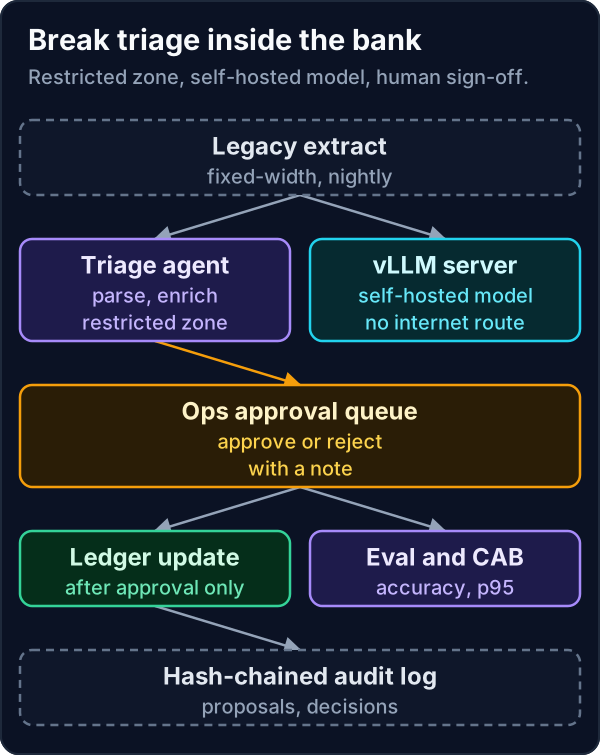
Each night a legacy settlement system writes a fixed-width file of breaks: our amount against the counterparty's, currency, trade reference and value date. Analysts spend the first hour of the day working out the likely cause of each one. The agent prepares that first pass. It proposes a cause for every break and queues it. An analyst approves or rejects each proposal with a note, and only approved items move on.
The network rules are strict. The operations zone has no route to the internet. The model runs on a GPU server in the same zone, served by vLLM. The agent may call that server and nothing else.
Which vLLM version, and why does it matter?
vLLM 0.32.0 was released on 18 October 2026, with 814 commits from 363 contributors according to its release notes. On 28 October 2026 eight GitHub security advisories for vLLM were published, all fixed in 0.32.0.
- **GHSA-6757-hggm-hp2w (high).** A forged public multimodal shared-memory handle can reach worker-side pickle.loads() even with insecure serialisation disabled.
- **GHSA-h3rc-j82p-2c3h (high).** Untrusted EPS inputs can trigger denial of service or Ghostscript remote code execution.
- **GHSA-542m-9234-8gvf (medium).** Unbounded chat_template Jinja2 rendering can exhaust the renderer thread pool.
- **GHSA-q97c-p368-75c4 (medium).** An out-of-vocabulary prompt token ID passes validation and can crash the engine.
- **GHSA-vvpg-rrww-wpmh (low).** Permissive default CORS origins allow cross-origin requests to the vLLM HTTP server.
The other three cover a Responses API bypass of trust_request_chat_template and two denial-of-service issues in multimodal processing. A text-only triage agent does not use most of the multimodal paths, but the server exposes them unless they are switched off. Pin 0.32.0 or later and disable features you do not use. A release candidate for 0.33.0 appeared on 2 November 2026, and it should go through the same gate as any other change before it reaches production.
How does the on-premise AI agent handle legacy data?
Legacy extracts rarely arrive as JSON. Parse fixed-width files by column position, keep the layout in one place and reject any line that does not match. The agent sends the parsed break, not the raw line, so the model sees clean fields.
break_triage_agent.py"""Trade-break triage agent for a restricted network. Python 3.14, standard library.
Reads a fixed-width extract from a legacy system, asks a self-hosted model behind
vLLM's OpenAI-compatible server for a proposed cause, and queues every proposal for
a person. Run with --offline to use a stub instead of the model."""
import datetime as dt, hashlib, json, sys, urllib.parse, urllib.request
MODEL_URL = "http://llm.internal:8000/v1/chat/completions"
ALLOWED_HOSTS = {"llm.internal"} # no route to the internet from this zone
EXTRACT = """BRK00041 TRD-88120 GBP 1250000.00 1249000.00 2026-11-06
BRK00042 TRD-88131 EUR 400000.00 400000.00 2026-11-07
BRK00043 TRD-88140 USD 75000.00 57000.00 2026-11-06"""
AUDIT: list[dict] = []
def audit(event: str, **data) -> None:
prev = AUDIT[-1]["hash"] if AUDIT else "0" * 16
rec = {"at": dt.datetime.now(dt.UTC).isoformat(timespec="seconds"), "event": event, **data}
rec["hash"] = hashlib.sha256((prev + json.dumps(rec, sort_keys=True)).encode()).hexdigest()[:16]
AUDIT.append(rec)
def parse(line: str) -> dict: # fixed columns from the legacy layout
return {"break_id": line[0:8], "trade": line[9:18], "ccy": line[19:22],
"ours": float(line[22:35]), "theirs": float(line[35:48]), "value_date": line[49:59]}
def ask_model(brk: dict, offline: bool) -> str:
if offline:
return "amount mismatch" if brk["ours"] != brk["theirs"] else "settlement date"
host = urllib.parse.urlparse(MODEL_URL).hostname
if host not in ALLOWED_HOSTS:
raise RuntimeError(f"blocked outbound host {host}")
body = {"model": "local-triage", "temperature": 0, "max_tokens": 20, "messages": [
{"role": "system", "content": "Reply with one cause: amount mismatch, settlement date, counterparty or unknown."},
{"role": "user", "content": json.dumps(brk)}]}
req = urllib.request.Request(MODEL_URL, json.dumps(body).encode(), {"Content-Type": "application/json"})
with urllib.request.urlopen(req, timeout=10) as r:
return json.load(r)["choices"][0]["message"]["content"].strip()
def triage(offline: bool) -> list[dict]:
queue = []
for line in EXTRACT.splitlines():
brk = parse(line)
cause = ask_model(brk, offline)
item = {**brk, "proposed_cause": cause, "status": "awaiting approval"}
queue.append(item)
audit("proposal", break_id=brk["break_id"], cause=cause)
return queue
def approve(item: dict, reviewer: str, decision: str, note: str = "") -> None:
item["status"] = decision
audit("decision", break_id=item["break_id"], reviewer=reviewer, decision=decision, note=note)
if __name__ == "__main__":
q = triage(offline="--offline" in sys.argv)
approve(q[0], "ops.reviewer", "approved")
approve(q[2], "ops.reviewer", "rejected", "fee booked twice, not an amount break")
for item in q:
print(item["break_id"], item["proposed_cause"], "->", item["status"])
print(len(AUDIT), "audit records, last hash", AUDIT[-1]["hash"])Python 3.14, standard library only. Run once in offline mode with a stub in place of the model. It parses three sample breaks from a fixed-width extract, proposes a cause for each, records one approval and one rejection with a note, and writes five hash-chained audit records.
The outbound check is deliberately simple. The agent reads its model URL from configuration, and the code refuses any host not on an allowlist of internal names. Network controls should block the same traffic, but the code check makes a misconfiguration fail loudly rather than quietly reaching somewhere it should not.
Where is the approval point, and what goes in the audit log?
The approval queue is the only path to the ledger. Each item shows the break, the proposed cause and the model version. The analyst approves, rejects or edits with a note. The audit log records the proposal, the decision, the reviewer and the time, and chains each record to the hash of the previous one so an edit shows up.
Our trading AI architecture playbook covers the wider break workflow, and the self-hosted LLM security worked example covers hardening the model server.
How do evaluation and change control work?
Every change to the model, the prompt or the vLLM version runs the same evaluation before it goes to the change advisory board. The run checks accuracy against labelled breaks, p95 latency against the limit the operations team agreed and the rate of unknown answers. The result is written against the change ticket.
latency_eval.py"""Evaluation run for a change ticket: accuracy and latency against agreed limits.
Python 3.14, standard library only. Uses a stub model so it runs anywhere,
swap classify() for the real call when running inside the bank's network."""
import json, random, statistics, time
CASES = [("BRK00041", "amount mismatch"), ("BRK00042", "settlement date"),
("BRK00043", "amount mismatch"), ("BRK00044", "counterparty"),
("BRK00045", "settlement date"), ("BRK00046", "amount mismatch"),
("BRK00047", "unknown"), ("BRK00048", "counterparty")] * 5
LIMITS = {"min_accuracy": 0.85, "max_p95_ms": 400, "max_unknown_rate": 0.25}
rng = random.Random(11)
def classify(break_id: str) -> str: # stub: replace with the vLLM call
time.sleep(rng.uniform(0.02, 0.12))
truth = dict(CASES)[break_id]
return truth if rng.random() > 0.08 else "unknown"
def run(change_ticket: str) -> dict:
lat, hits, unknown = [], 0, 0
for break_id, expected in CASES:
t0 = time.perf_counter()
got = classify(break_id)
lat.append((time.perf_counter() - t0) * 1000)
hits += got == expected
unknown += got == "unknown"
p95 = statistics.quantiles(lat, n=20, method="inclusive")[18]
result = {"change_ticket": change_ticket, "cases": len(CASES),
"accuracy": round(hits / len(CASES), 3), "p50_ms": round(statistics.median(lat)),
"p95_ms": round(p95), "unknown_rate": round(unknown / len(CASES), 3)}
fails = []
if result["accuracy"] < LIMITS["min_accuracy"]:
fails.append("accuracy")
if result["p95_ms"] > LIMITS["max_p95_ms"]:
fails.append("latency")
if result["unknown_rate"] > LIMITS["max_unknown_rate"]:
fails.append("unknown rate")
result["verdict"] = "fail: " + ", ".join(fails) if fails else "pass, ready for CAB approval"
return result
if __name__ == "__main__":
print(json.dumps(run("CHG-20261107-014"), indent=2))Python 3.14, standard library only. Uses a stub so it runs anywhere. Against 40 labelled sample cases it records accuracy of 0.875, p50 and p95 latency and an unknown rate of 0.25, then passes the change for board approval because every figure is inside the limits.
Latency matters because the analysts start at a fixed time. If triage of a typical night's breaks does not finish before then, the agent is no help. Set the limit from the batch size and the deadline, and test on the production GPU, not a laptop.
What breaks in production?
- **Layout drift.** The legacy system adds a column and every parse shifts. Validate the header or line length and stop on change.
- **Model server exposure.** A vLLM server reachable from user networks invites the issues above. Bind it to the agent's network segment only.
- **Unknowns pile up.** A model that answers unknown too often moves work back to analysts. Track the rate and treat a rise as a defect.
- **Stale approvals.** A break that changed overnight should not be approved on yesterday's proposal. Check the record version before applying.
- **Upgrades skipped.** A pinned server that never updates collects advisories. Put vLLM releases on the same patch calendar as the rest of the estate.
What are the trade-offs and alternatives?
A hosted model through a cloud provider's private networking is faster to start and removes GPU operations, at the cost of data leaving the bank's own hardware. A rules engine handles the clear cases, such as identical amounts with different dates, with no model at all. In practice the best build often routes clear cases through rules and sends only the rest to the model.
Smaller self-hosted models are cheaper and faster to run, and for a closed set of causes they often match larger ones. Evaluation on your own breaks decides. As a Workflow Automation Agency we start with rules plus a small model and only move up when the numbers say so.
Where should a team start?
Take one month of break files and label the cause for a few hundred breaks. That set is your evaluation and your first measure of value. Our blog on sovereign cloud and data residency covers the hosting choice, and our AI Agency UK and Workflow Automation London teams can run the build as a 14-day Proof Run alongside the daily mismatch report. This is an illustrative engineering example and is not legal or regulatory advice.
Frequently asked questions
Which vLLM version fixes the October 2026 advisories?
The eight vLLM advisories published on 28 October 2026 are fixed in vLLM 0.32.0, released on 18 October 2026.
Can an AI agent run without internet access?
Yes. The model runs on a server inside the network, served by a tool such as vLLM, and the agent is allowed to call only that internal host.
Where should the human approval sit in a break triage agent?
Between the proposal and the ledger. Every proposed cause waits in a queue, and the ledger changes only after an analyst approves.
How do you evaluate a self-hosted model for change control?
Run a labelled set of real cases through it, check accuracy, p95 latency and the rate of unknown answers against agreed limits, and attach the result to the change ticket.
References
- vLLM on GitHub, "vLLM v0.32.0 release notes", 18 October 2026. https://github.com/vllm-project/vllm/releases/tag/v0.32.0
- GitHub Advisory Database, "GHSA-6757-hggm-hp2w: vLLM public multimodal SHM handle forgery reaches worker-side pickle.loads()", 28 October 2026. https://github.com/advisories/GHSA-6757-hggm-hp2w
- GitHub Advisory Database, "GHSA-h3rc-j82p-2c3h: vLLM untrusted EPS inputs can trigger denial of service or Ghostscript RCE", 28 October 2026. https://github.com/advisories/GHSA-h3rc-j82p-2c3h