Workflow Automation · BraivIQ AI Engineering Playbook
Workflow Automation Architecture For Human Sign-Off: Durable Approval Steps With LangGraph 1.2 In Python
A workflow automation architecture that a financial firm can sign off has three properties at the approval step: it can wait for days without losing state, it only accepts a decision in a known shape from a known person, and the action after approval runs exactly once even if the process crashes. LangGraph 1.2.12, released on 21 September 2026, added a response schema to interrupt(), so a resume value is validated before the workflow continues. Google's ADK 2.9.0 changed resume behaviour on 10 September so a failed step runs again, which makes idempotent side effects compulsory. This playbook builds a client bank-detail change with all three properties in tested Python.
Published · Updated · 12 min read · By BraivIQ Engineering

Key takeaways
- LangGraph 1.2.12 (21 September 2026) lets
interrupt()take a Pydantic model asresponse_schema. A resume value that does not match raisesValidationErrorand the workflow does not continue. - On resume, LangGraph re-runs the interrupted node from its start, and Google ADK 2.9.0 (10 September 2026) now re-runs failed nodes too. Any side effect that can run twice must be idempotent.
- The approver's identity must come from the authenticated session, never from the request body, and the requester must not be able to approve their own change.
- A record can change while an approval waits for days. Check its version at apply time and send stale changes back for a fresh decision.
- Both samples were run on Python 3.14.4 and 3.11.14 with langgraph 1.2.14 and fastapi 0.143.0, pass
mypy --strict, and have tests for approval, the four-eyes rule, stale records, double submission and a crash after the write.
21 Sep 2026 - LangGraph 1.2.12 added a response schema to `interrupt()`, so resume values are validated · 10 Sep 2026 - Google ADK 2.9.0 began re-running failed nodes on resume, so side effects must be idempotent · 1 - Number of writes a resumed, retried or crashed approval step should ever make · 5 - Paths our tests cover: approve, four-eyes, stale record, double submit, crash after write
The approval step is where most automated workflows in financial firms either earn trust or lose it. A good workflow automation architecture lets that step wait for days without losing state, accepts a decision only in a known shape from an authenticated person, and makes sure the action after approval happens exactly once. Two releases in September 2026 made this easier to build and harder to get wrong, and this playbook uses them to build a client bank-detail change in tested Python.
Bank-detail changes are a good test case because they are a well-known route for fraud. A sound process has someone call the client back on a number already on file before anything changes, and the workflow should make that call-back a required field rather than a habit.
What changed for durable approval steps in September 2026?
On 21 September 2026 LangChain released langgraph 1.2.12 with a response_schema argument on interrupt(). Pass a Pydantic model, a TypedDict or a dataclass, and LangGraph shows its JSON schema to clients and validates the value you resume with. A value that does not match raises pydantic.ValidationError and the node does not continue. Pass a plain dict and it is shown but not validated. The current release is 1.2.14, published on 6 October 2026.
On 10 September 2026 Google's ADK 2.9.0 changed what happens when a workflow resumes after a failed node. The release notes say "A node that failed now runs again when the workflow resumes" and warn that "a node that performs an external side effect and then fails will perform that side effect again on every resume". LangGraph's own interrupts behave the same way: its documentation says the graph "resumes from the start of the node, re-executing all logic".
The same month brought approval support elsewhere. ADK 2.11.0, released on 1 October, made tool nodes in workflows pause for user approval through RequestInput, and Temporal's Python SDK 1.34.0, released on 30 September, added experimental durable human-in-the-loop support for ADK workflows.
What does a workflow automation architecture with durable approvals look like?
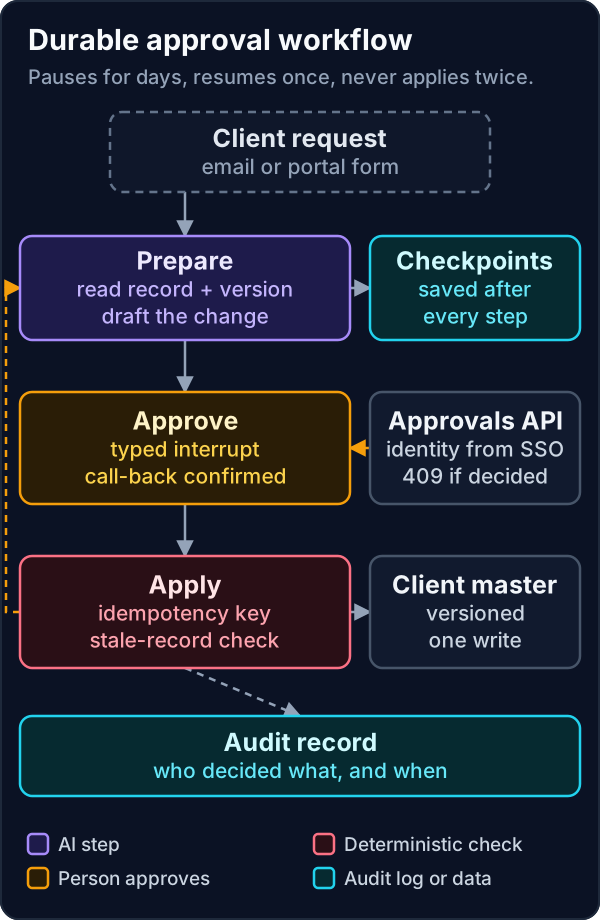
Five parts. A prepare step reads the record and its version and drafts the change. A checkpointer saves state after every step, so the workflow survives restarts and can wait as long as it needs. An approve step pauses with a typed interrupt. An approvals API is the only route by which a decision reaches the workflow, and it takes the reviewer's identity from single sign-on. An apply step checks the record version and an idempotency key before it writes, and every step writes to the audit record.
What do the workflow automation code samples look like?
The first sample is the workflow itself, written against langgraph 1.2.14 with langgraph-checkpoint-sqlite 3.1.1 and pydantic 2.14.0. We ran it on Python 3.14.4 and 3.11.14 and it passes mypy --strict. The client record is sample data, and SQLite stands in for the Postgres checkpointer you would run in production.
bank_details_workflow.py"""A durable approval step for a client bank-detail change, built on LangGraph.
Python 3.11+, langgraph 1.2.14 (typed interrupts need 1.2.12+), langgraph-checkpoint-sqlite 3.1.1,
pydantic 2.14.0. Client records are sample data. Use PostgresSaver rather than SQLite in production.
"""
from __future__ import annotations
import hashlib
import json
import sqlite3
from datetime import datetime, timezone
from typing import Any, Literal, TypedDict
from langgraph.checkpoint.base import BaseCheckpointSaver
from langgraph.checkpoint.sqlite import SqliteSaver
from langgraph.graph import END, START, StateGraph
from langgraph.graph.state import CompiledStateGraph
from langgraph.types import Command, interrupt
from pydantic import BaseModel
class Decision(BaseModel):
"""The only shape a resume value may take. Anything else raises before the node continues."""
approver_id: str
decision: Literal["approve", "reject"]
callback_verified: bool # the approver rang the client on the number already on file
note: str = ""
class State(TypedDict, total=False):
requested_by: str
proposal: dict[str, str]
record_version: int
decision: dict[str, Any]
outcome: str
# Sample systems of record, standing in for your client master and an idempotency table.
CLIENTS: dict[str, dict[str, Any]] = {
"CL-204518": {"version": 7, "sort_code": "20-00-00", "account_number": "55779911", "account_name": "J Smith"},
}
APPLIED: dict[str, str] = {}
AUDIT: list[dict[str, Any]] = []
CRASH_AFTER_WRITE = {"armed": False} # lets the demo simulate a crash between the write and the checkpoint
def audit(event: str, **detail: Any) -> None:
AUDIT.append({"ts": datetime.now(timezone.utc).isoformat(), "event": event, **detail})
def prepare(state: State) -> State:
# In production an extraction step fills `proposal` from the client's email, using a
# tool-less reader (see the prompt injection playbook). Here the proposal arrives ready.
version = int(CLIENTS[state["proposal"]["client_id"]]["version"])
audit("prepared", client_id=state["proposal"]["client_id"], record_version=version)
return {"record_version": version}
def approve(state: State) -> Command[Literal["apply", "record"]]:
current = CLIENTS[state["proposal"]["client_id"]]
decision = interrupt(
{"action": "change_bank_details", "proposal": state["proposal"],
"current_account_ending": str(current["account_number"])[-4:], "record_version": state["record_version"]},
response_schema=Decision,
)
audit("decided", approver=decision.approver_id, decision=decision.decision, callback=decision.callback_verified)
if decision.approver_id == state["requested_by"]:
return Command(goto="record", update={"decision": decision.model_dump(), "outcome": "rejected: four-eyes rule"})
if decision.decision == "reject" or not decision.callback_verified:
return Command(goto="record", update={"decision": decision.model_dump(), "outcome": "rejected"})
return Command(goto="apply", update={"decision": decision.model_dump()})
def apply(state: State) -> Command[Literal["prepare", "record"]]:
proposal = state["proposal"]
key = hashlib.sha256(json.dumps({"p": proposal, "v": state["record_version"]}, sort_keys=True).encode()).hexdigest()
if key in APPLIED: # this node can run more than once: after a crash, a retry or a resume
return Command(goto="record", update={"outcome": "applied"})
record = CLIENTS[proposal["client_id"]]
if record["version"] != state["record_version"]: # the record changed while the approval waited
audit("stale", client_id=proposal["client_id"], approved_version=state["record_version"], now=record["version"])
return Command(goto="prepare", update={"outcome": "stale: sent back for a fresh approval"})
record.update({k: proposal[k] for k in ("sort_code", "account_number", "account_name")})
record["version"] += 1
APPLIED[key] = datetime.now(timezone.utc).isoformat()
if CRASH_AFTER_WRITE["armed"]:
CRASH_AFTER_WRITE["armed"] = False
raise RuntimeError("simulated crash after the write, before the checkpoint")
return Command(goto="record", update={"outcome": "applied"})
def record(state: State) -> State:
audit("closed", client_id=state["proposal"]["client_id"], outcome=state.get("outcome"),
approver=state.get("decision", {}).get("approver_id"))
return {}
def build(checkpointer: BaseCheckpointSaver[Any]) -> CompiledStateGraph[State, None, State, State]:
g = StateGraph(State)
g.add_node("prepare", prepare)
g.add_node("approve", approve)
g.add_node("apply", apply)
g.add_node("record", record)
g.add_edge(START, "prepare")
g.add_edge("prepare", "approve")
g.add_edge("record", END)
return g.compile(checkpointer=checkpointer)
if __name__ == "__main__":
from langchain_core.runnables import RunnableConfig
from pydantic import ValidationError
graph = build(SqliteSaver(sqlite3.connect("workflows.db", check_same_thread=False)))
cfg: RunnableConfig = {"configurable": {"thread_id": "bank-change-CL-204518-0001"}}
proposal = {"client_id": "CL-204518", "sort_code": "40-11-22", "account_number": "11223344", "account_name": "J Smith"}
out = graph.invoke({"requested_by": "j.patel", "proposal": proposal}, cfg)
print("paused:", out["__interrupt__"][0].value["action"])
try: # a resume that skips the call-back confirmation is refused by the schema
graph.invoke(Command(resume={"approver_id": "s.okafor", "decision": "approve"}), cfg)
except ValidationError as exc:
print("refused resume:", exc.errors()[0]["loc"])
CRASH_AFTER_WRITE["armed"] = True
try:
graph.invoke(Command(resume={"approver_id": "s.okafor", "decision": "approve", "callback_verified": True}), cfg)
except RuntimeError as exc:
print("crashed:", exc)
out = graph.invoke(None, cfg) # resume from the last checkpoint: apply runs again
print("outcome:", out["outcome"], "| version:", CLIENTS["CL-204518"]["version"], "| writes:", len(APPLIED))Running it prints four lines. The workflow pauses with a change_bank_details request. A resume that leaves out callback_verified is refused by the schema, and the workflow stays paused. A valid approval is submitted while a simulated crash is armed, so the write happens and the process dies before the checkpoint. Resuming from the last checkpoint re-runs the apply step, which finds its idempotency key and finishes without a second write: the record ends at version 8 with one write.
Three details carry the weight. The decision model makes the call-back a required boolean, so the paper process becomes a field the reviewer must set. The four-eyes rule compares the approver with the person who asked for the change. And the apply step checks the idempotency key before the stale check, because after a successful write the version has moved on and a re-run would otherwise mistake its own write for someone else's.
How do people approve without touching the workflow engine?
Through a small API that is the only way a paused workflow resumes. The second sample uses FastAPI 0.143.0, released on 8 October 2026. The reviewer's identity comes from a header set by your single sign-on proxy after authentication, never from the JSON body, so a reviewer cannot approve as somebody else by editing a request.
approvals_api.py"""Approvals API: the only route by which a paused workflow resumes.
Python 3.11+, fastapi 0.143.0, langgraph 1.2.14. Runs behind your single sign-on proxy,
which authenticates the reviewer and sets X-Authenticated-User. Never expose it directly.
"""
from __future__ import annotations
import sqlite3
from typing import Any, Literal
from fastapi import Depends, FastAPI, Header, HTTPException
from langchain_core.runnables import RunnableConfig
from langgraph.checkpoint.sqlite import SqliteSaver
from langgraph.types import Command
from pydantic import BaseModel
from bank_details_workflow import Decision, build
graph = build(SqliteSaver(sqlite3.connect("workflows.db", check_same_thread=False)))
app = FastAPI(title="Approvals")
class DecisionIn(BaseModel):
"""What the reviewer submits. Their identity comes from the session, never from this body."""
decision: Literal["approve", "reject"]
callback_verified: bool
note: str = ""
def reviewer(x_authenticated_user: str = Header()) -> str:
return x_authenticated_user
def thread(thread_id: str) -> RunnableConfig:
return {"configurable": {"thread_id": thread_id}}
@app.get("/approvals/{thread_id}")
def pending(thread_id: str, user: str = Depends(reviewer)) -> dict[str, Any]:
snapshot = graph.get_state(thread(thread_id))
if not snapshot.interrupts:
raise HTTPException(status_code=404, detail="nothing is waiting for approval")
return {"thread_id": thread_id, "request": snapshot.interrupts[0].value,
"response_schema": Decision.model_json_schema()}
@app.post("/approvals/{thread_id}")
def decide(thread_id: str, body: DecisionIn, user: str = Depends(reviewer)) -> dict[str, Any]:
if not graph.get_state(thread(thread_id)).interrupts:
raise HTTPException(status_code=409, detail="nothing is waiting, or it was already decided")
out = graph.invoke(Command(resume={"approver_id": user, **body.model_dump()}), thread(thread_id))
if "__interrupt__" in out: # for example the record changed and needs a fresh approval
return {"status": "waiting", "request": out["__interrupt__"][0].value}
return {"status": out.get("outcome", "unknown")}Our test drives it through FastAPI's test client. The GET returns the pending request and the decision schema. A POST from the requester is recorded as rejected under the four-eyes rule. When the record changes while an approval waits, the POST returns waiting with a fresh request, and a second approval then applies the change once. A further POST after the decision gets 409, and a POST with no identity header gets 422 before anything runs.
What breaks in production?
- **Code before the interrupt runs twice.** LangGraph re-runs the interrupted node from the top when it resumes. Keep anything with a side effect after the interrupt, and make it idempotent.
- **Deploys while workflows are paused.** A thread can sit for a week while you ship new code. Add new decision fields as optional, never reorder interrupts in a node, and keep a way to list and drain paused threads before a breaking change.
- **The wrong checkpointer.** SQLite is fine for a demo and a single process. Several workers need the Postgres checkpointer and a database your operations team already backs up.
- **An idempotency table that is not transactional.** In the sample the key store is a dictionary. In production it is a table with a unique constraint, written in the same transaction as the change to the record.
- **Approvals nobody chases.** A paused thread does not notify anyone. Run a scheduled job that lists pending interrupts, alerts the queue owner after a set time and escalates.
- **Identity headers that can be forged.** The header approach is only safe behind a proxy that strips it from incoming requests and sets it after authentication. Lock the service down so nothing else can reach it.
Which durable approval option should you choose?
The approval step works in any of these engines. What differs is who operates it and how much of the safety you build yourself.
| Option | Strength | What you still build |
|---|---|---|
LangGraph interrupt() with response_schema | Agent logic and the pause in one graph, validated resume values | Approvals API, idempotency, escalation |
| Temporal (Python SDK 1.34.0) | Durable execution engine with its own server, experimental durable HITL for ADK | Operating the cluster, approvals UI |
Google ADK RequestInput (2.11.0) | Pauses tool nodes for approval inside ADK workflows | Identity, binding to exact arguments, audit |
| Copilot Studio hooks (preview) | Policy checks on every tool call in Microsoft 365 | Hooks fail open, so a durable approval still needs its own store |
| A BPM or case management system | Mature queues, SLAs and reporting | Integration with the agent and versioned records |
Whichever you choose, the approval should bind to exact arguments and be signed by a named person, as our featured playbook on agentic AI architecture with approval gates shows. For checkpointing, retries and long-running state in more depth, see our earlier guide to durable, crash-safe agent workflows with LangGraph 1.2. Our blog covered why hard stops in workflow automation matter to operations leaders.
How does a Workflow Automation Agency put this live in a financial firm?
Pick the change that worries your operations team most, usually bank details, standing instructions or client addresses, and put this architecture around it first. Measure how long approvals wait, how many are rejected and why, and how many stale records the version check catches, because those numbers tell you whether the process is working. As a Workflow Automation London team that builds these for UK financial firms, we deliver one such workflow, live with your people approving, in a 14-day Proof Run. The workflows we build are listed on our services page.
Frequently asked questions
What is workflow automation architecture?
It is the structure of an automated process: its steps, where state is kept, where people make decisions, how side effects are made safe to repeat and how every step is recorded. For a financial firm the approval steps and the audit record are the parts a reviewer looks at first.
How does LangGraph human in the loop work?
A node calls interrupt() with the information a person needs. The graph saves its state through a checkpointer and stops. When a person decides, your code resumes the graph with Command(resume=...), and since LangGraph 1.2.12 the resume value can be validated against a Pydantic model. The interrupted node then runs again from its start, with interrupt() returning the decision.
What happens if a workflow crashes after it writes to a system of record?
The step runs again when the workflow resumes, because the checkpoint was saved before the write. Without an idempotency key the write happens twice. With one, as in the sample, the second run sees the key and moves on without writing.
Should we use LangGraph or Temporal for long-running approvals?
Both can hold a workflow open for days. LangGraph keeps the agent logic and the pause in one graph and is quicker to start. Temporal is a durable execution engine with its own server, and its Python SDK 1.34.0 (30 September 2026) added experimental durable human-in-the-loop support for Google ADK workflows. Choose by who will operate it, and keep the approval API and idempotent writes either way.
References
- LangChain (GitHub), "langgraph 1.2.12 release: add response_schema to interrupt()", 21 September 2026. https://github.com/langchain-ai/langgraph/releases/tag/1.2.12
- Python Package Index, "langgraph 1.2.14", 6 October 2026. https://pypi.org/project/langgraph/1.2.14/
- Google (GitHub), "ADK Python v2.9.0 release: workflow node resumption behaviour change", 10 September 2026. https://github.com/google/adk-python/releases/tag/v2.9.0
- Google (GitHub), "ADK Python v2.11.0 release: tool confirmation in workflows", 1 October 2026. https://github.com/google/adk-python/releases/tag/v2.11.0
- Temporal (GitHub), "Temporal Python SDK 1.34.0 release", 30 September 2026. https://github.com/temporalio/sdk-python/releases/tag/1.34.0
- Python Package Index, "fastapi 0.143.0", 8 October 2026. https://pypi.org/project/fastapi/0.143.0/
- Python Package Index, "langgraph-checkpoint-sqlite 3.1.1", 30 July 2026. https://pypi.org/project/langgraph-checkpoint-sqlite/3.1.1/